EZCAP 4-In-1 HDMI HD Video Capture USB3.0 to PC Multi Camera Record Live Stream

6 590,00 Kč
doprava ZDARMA

EZCAP 4-In-1 HDMI HD Video Capture USB3.0 to PC Multi Camera Record Live Stream

  • Značka: Unbranded
Prodal(a):

EZCAP 4-In-1 HDMI HD Video Capture USB3.0 to PC Multi Camera Record Live Stream

  • Značka: Unbranded

6 590,00 Kč

Skladem
doprava ZDARMA

Politika 14denního vrácení

Prodal(a):

6 590,00 Kč

Skladem
doprava ZDARMA

Politika 14denního vrácení

Způsoby platby:

Popis

EZCAP 4-In-1 HDMI HD Video Capture USB3.0 to PC Multi Camera Record Live Stream

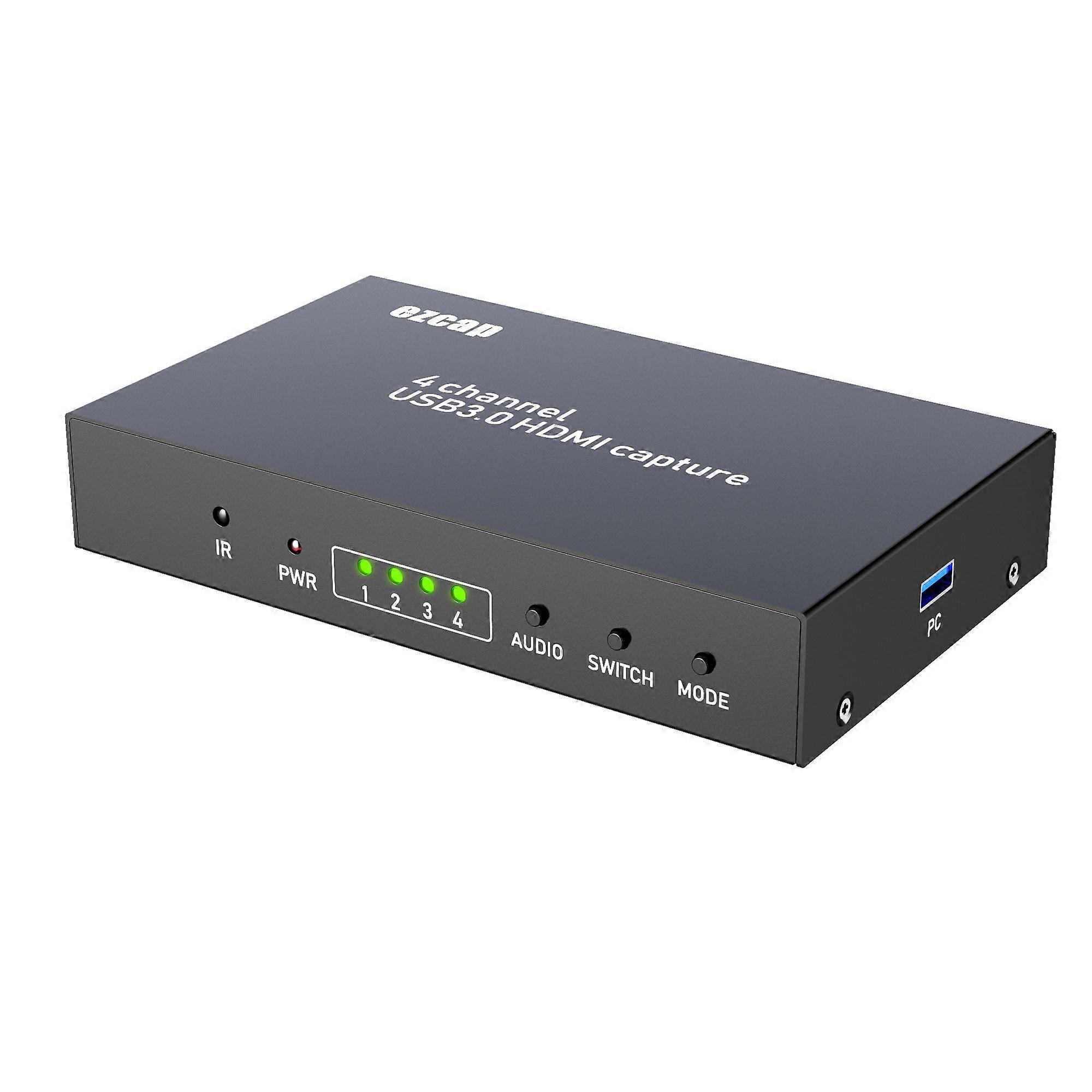
PRODUCT DESCRIPTION: Ezcap264 capture/live stream full HD 1080 60 video through USB3.0 port, user can capture 1 or 2, or 4 channel same time depends you need. Features: 1. HDMI IN Connect video source with HDMI cable2. HDMI OUT Connect to TV with HDMI cable3. DC DC 5V2A supply4. USB3.0 Connect to computer with USB3.0 cable Ezcap264A doesnt have this port. 5. MODE Switch between one channel view mode and multi-view mode6. SWITCH: When the mode been set to One channel view mode by above MODE button, press this button to switch display each channel: CH1, CH2, CH3, CH4When the mode been set to Multi-view mode, press this button to switch the multi view mode between: Quad-view, Quad-view (1 3), Dual-view, Dual-view (PIP) 7. AUDIO Switch which channels audio will be preview. 8. LEDs 1~4 shows the channels connecting. PWR for power9. IR receiverRemote controller Quad-View Quad-View (1 3) Dual-View(PIP) One-View, press again to switch channels Audio channel 1, 2, 3, 4 Press to choose which channels audio willbe played. Multi-view operation: Power on ezcap264 /ezcap264AConnect video source to HDMI input each channel Connect HDMI OUT to TVUse buttons or remote controller to operate. For ezcap264, you can connect to PC with an USB3.0 cable, so can capture or stream video, Following is the manual for ezcap264. (no need read down for ezcap264A) Work on windows Work with OBS Studio: 1, Go to obsproject.com/download to download OBS Studio according to your computers operating system, and install it on your computer. 2, Run OBS Studio, Click icon under Sources window, and select Video Capture Device, then select ezcap U3 capture in the drop box next to Device 3, At Set Audio Output Mode to Output desktop audio (WaveOut), Audio Device to ezcap U3 capture 4, Set the video latency for make the audio and video synchronized: 1) Right click Video Capture Device then click Filters 2) Click to add Video Delay (Async) 3) Set it to 470ms (You can adjust it smaller or bigger until you found the audio and video synchronized) 5, Then you can recording or streaming videoFor other applications may also need settingfor synchronous problem: On VLC: ToolsEffects and Filters----Synchronization then adjust the delay value of Audio track synchronization, till audio video synchronousOn Amcap, Capture---Setup----Preview, set the Audio latency (normally to 10ms) Work with other applications (e.g. VLC, Media encoder, Protplayer): Just run the application then choose capture device to ezcap U3 capture Work on MAC: Work with OBS Studio: Download and install OBS studio, then do the same as above on windows. Work with QuickTime Player: 1, Run QuickTime player, select New Movie Recording 2, Choose ezcap U3 capture under Camera and Microphone option Work on Linux: Work with OBS Studio: Download and install OBS studio, then do the same as above on windows. (note: Your Linux should meet OBS requirements) Work with OBS VLC (shows example for Ubuntu): 1, Right click on window, select Open Capture Device 2, Choose Video camera ---/dev/video0 then click play Using as screen sharing for online meeting: 1, First install a application and set it as above ( OBS, VLC, etc) on the computer which for meeting (with online meeting App installed, e.g.: Zoom, Skype for Business, WebEx, BlueJeans) 2, Connect the contents laptop via HDMI cable to ezcap264, then USB cable to meeting computerShow example for meeting App Zoom: Use VLC (or other application as mentioned above) open the ezcap U3 capture and get the video of the contents laptop ( see the manual above) At meeting interface, click Share ScreenSelect VLC Media Player (or other application you just opened), then click Share Screen" The contents and presenter shows in same time Specifications: ConnectionsInterface:USB 3. 0Video Input:HDMI X 4 Audio Input:HDMI X 4 Video Output:HDMI Audio Output:HDMI Hardware Extra: Dimensions:170*100*30MM Weight:460g Package Contents: Device ezcap264 / ezcap264AOthers 5V2A Power supply, remote controller, manual, USB3.0 cable (only for ezcap264) Standards: System Requirement:Windows 7,8,10, OS X 10.9 or later, Linux. PC: Intel Core i5-3400 NVIDIA GT630, NB: Intel Core i7-3537U 2.0 GHz NV
  • Fruugo ID: 101445336-213506199
  • EAN: 5946662155786

Informace o bezpečnosti produktu

Přečtěte si prosím níže uvedené informace o bezpečnosti produktu specifické pro tento produkt

Následující informace poskytuje nezávislá třetí strana prodejce tohoto produktu.

Bezpečnostní štítky produktu

CE Mark
bezpečnostní upozornění: Not suitable for children under 36 months

Doručení a vrácení

Odesláno do 24 hodin

  • STANDARD: ZDARMA - Doručení mezi čt 29 ledna 2026–po 09 února 2026 - ZDARMA

Doprava od Čína.

Děláme, co můžeme, aby k vám produkty, které si objednáte, dorazily kompletní a splňovaly vaše specifikace. Pokud však objednávka dorazí nekompletní, produkty jsou rozdílné od těch, které jste si objednali, nebo existuje jiný důvod k nespokojenosti s objednávkou, můžete objednávku nebo jakékoliv v ní obsažené produkty vrátit a obdržet za ně plnou náhradu. Zobrazit kompletní zásady vrácení

Podrobnosti o shodě produktu

Přečtěte si prosím níže uvedené informace o shodě specifické pro tento produkt.

Následující informace poskytuje nezávislá třetí strana prodejce tohoto produktu.

Výrobce:
V následujících informacích jsou uvedeny kontaktní údaje na výrobce příslušného výrobku prodávaného na Fruugo.

  • QingDaoRongZhanGongMaoYouXianGongSi
  • QingDaoRongZhanGongMaoYouXianGongSi
  • Huangdaoqu Zhujianglu1355hao 2405-16shi
  • Qingdao
  • CN
  • 266000
  • jidks563@outlook.com
  • https://www.cdiscount.com/mpv-117387-fengdistore.html

Odpovědná osoba v EU:
V následujících informacích jsou uvedeny kontaktní údaje na odpovědnou osobu v EU. Odpovědná osoba je určený ekonomický subjekt působící v rámci EU, který je odpovědný za dodržování požadavků stanovených pro příslušný výrobek prodávaný do Evropské unie.

  • VAT SPEED SL
  • VAT SPEED SL
  • Calle Antonio Salvador N99.1,28026 Madrid,Spain
  • Madrid
  • Spain
  • 28026
  • services@vatspeed-eu.com
  • https://www.cdiscount.com/mpv-117387-fengdistore.html